I planned this article on my phone during a train ride to Milan. Back home, I typed one word and it went live. Here's the setup behind it, starting with a little context.
Today's frontier models are widely available through APIs, and a common way to use them is through a harness on your own computer, such as Claude Code or OpenCode. The harness lets an AI agent interact with local files, make changes and produce output.
An individual model invocation is stateless: to build on a previous discussion, it needs the relevant context made available to it. The harness or provider's API manages that context, which can include conversation history, summaries and selected information. Many agent systems also use persistent memory: usually notes on important facts and decisions that carry across conversations and projects.
Shared memory first
That idea intrigued me. My own setup is spread thin: subscriptions with several providers, chats on the web, local sessions on different machines, and project work scattered across all of them.
The first problem was consolidating memory across machines and harnesses. I defined a few basic rules for a memory
layout in a shared folder (Dropbox in my case, but Google Drive would work just as well). Each harness is instructed
to read and update the relevant notes via a custom instruction in a global AGENTS.md, with the equivalent
in CLAUDE.md for Claude Code.
The layout itself is simple:
~/dropbox/memory/
├── MEMORY.md            # rules, conventions, links to notes
├── <note>.md            # detailed note on a concept
└── projects/
    └── <project>/
        ├── MEMORY.md    # same as above with short summaries for smaller models
        └── <note>.md    # detailed note on a concept
One of the rules is that anything written to memory needs a manual confirmation. This keeps sync conflicts down and the memory lean: even with today's large context windows, every token spent on memory is one less for the actual work. It also matters for security, since anything written to memory syncs to every machine and harness that reads it.
For local work across machines, this alone got me roughly 80% of the way there, a figure measured with exactly the rigour you'd expect.
An always-on environment
The next problem was moving between web chats and local work. If I started a discussion in a provider's web chat while on a train, I had to re-establish the context once I switched to a local harness, because those chats live outside my shared memory. So I looked into self-hosting an agent environment that would give me:
- Shared memory across sessions and projects.
- Always-on access for discussing work.
- Continuity across machines, so I could continue a discussion and get work done wherever I was.
- Model freedom, without being locked to a proprietary provider.
- Harness freedom, without being beholden to a proprietary UI. Shared memory already makes this less of a concern.
Why not an existing platform?
These requirements rule out proprietary agent platforms, but there are several viable open-source options. OpenClaw, Agent Zero and Hermes Agent all support general-purpose agents, persistent memory and background work. One of them would probably have fit the bill, but I had two additional considerations.
First, I already had a working memory layout shared across multiple harnesses. I wanted something that would sit on top of that foundation, rather than adapting the foundation to a new platform.
Second, I wanted the freedom to extend the setup in whichever direction I chose. I want to own the security model: what agents can access, where they can execute commands, how they are isolated and which actions require my approval.
A pre-built solution can be customised, of course, but I wanted to draw those boundaries from day one. Choosing and connecting the building blocks seemed more straightforward than reshaping a packaged system around my own security model.
The setup
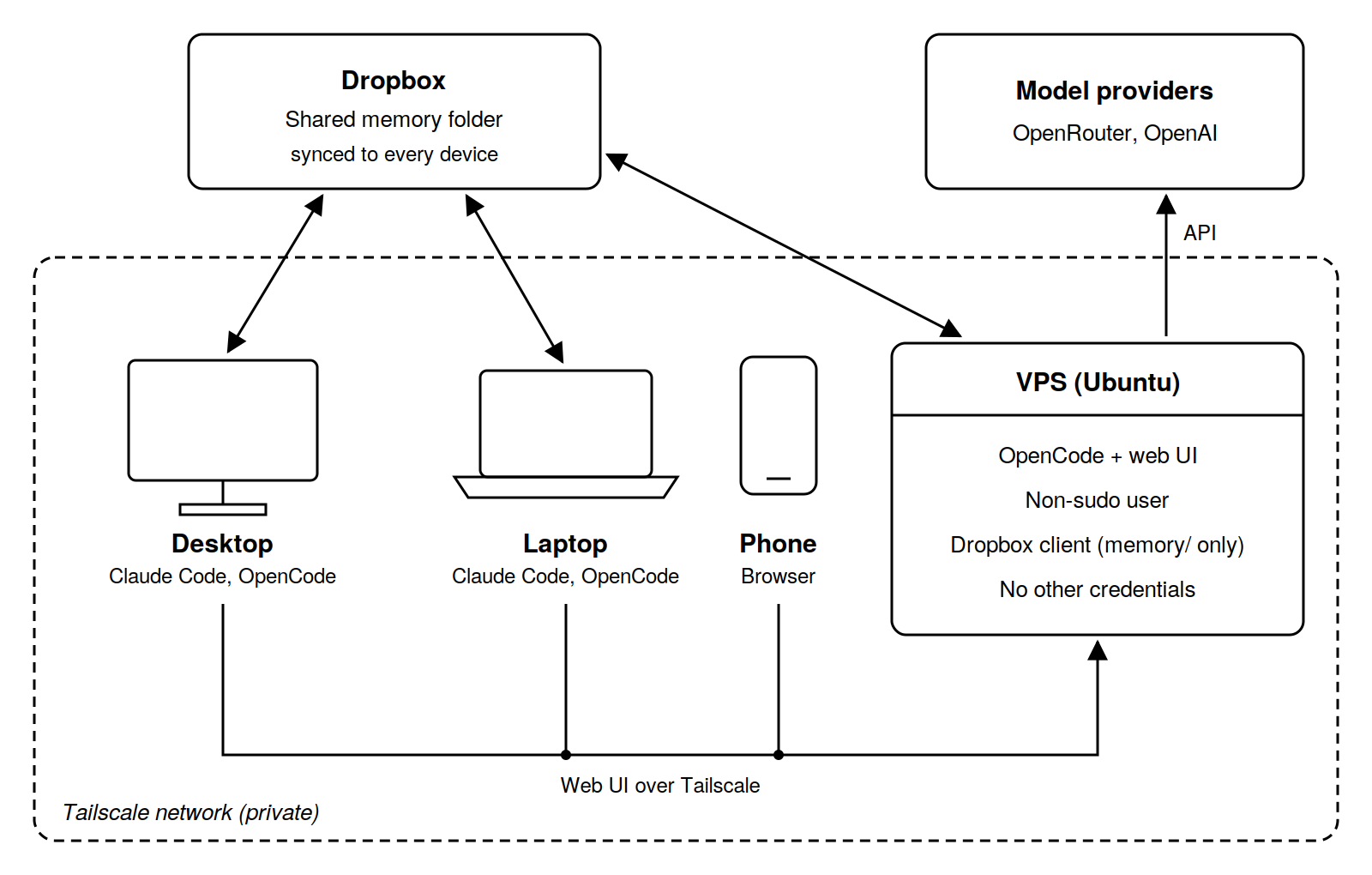
For me, an agent environment brings together an existing harness, shared memory, remote access and the boundaries within which the agent can work. Mine turned out to be simple:
- OpenCode on a VPS, with models via OpenRouter and an OpenAI subscription.
- My existing shared memory, synced to the VPS by the headless Dropbox client on a fixed schedule.
- OpenCode's built-in web UI, which replaces provider web chats for me.
- Private access through Tailscale.
The boundaries are where my security model lives:
- An Ubuntu VPS with a non-sudo account running OpenCode.
- No egress to other machines on the Tailscale network.
- Writes limited to working directories; read access elsewhere.
- No credentials beyond the model providers (the OpenRouter key has a usage limit) and Dropbox, which runs under a separate account and only syncs the memory folder.
- Shared memory backed by Dropbox file versioning and regular backups.
Ninety minutes and one leap of faith
I had been exploring the idea for a few days, but the implementation took 90 minutes in total. Opus 5.5 designed and implemented the solution, and I spent most of that time insisting it give me instructions to run by hand. At roughly the 80% mark (that number again), with Tailscale and OpenCode working, I let go and asked it to SSH into the box and finish the job. Yes, I'm aware of the irony after all that talk about security models, but there were no credentials on the box anyway.
Dogfooding the agent
I came up with the idea for this article and started the discussion through the web UI. This blog runs on a custom Node.js setup, and my shared memory already had notes covering its content and style, so the agent could pick up the existing context straight away.
I provided the initial text, discussed the research and structure with the agent, and worked out a plan for implementing and publishing it, which went into the blog's notes. All of this happened on my phone, on a train to Milan.
When I got back home, I opened a fresh Claude Code session in my blog project and typed please continue.
Based on my shared memory, it presented an implementation and a deployment plan. The next word I typed was
go. Five minutes later, the article was live. As a counterpoint, preparing and refining the text took
over two hours, which says more about me than about the setup.
That is exactly the continuity I wanted: discuss and plan the work wherever I happen to be, then pick it up on another machine. It's also my harness-freedom requirement proven in practice: the planning happened in OpenCode, the implementation in Claude Code, and shared memory was the common ground for both.
Three weeks in: realms and a git mirror
Since publishing this, I've added two things to the memory layout.
Realms. Some notes apply to a group of projects but not to all of them: who's who at work, say, or how my
servers are set up. At the root they would load into every session, and copied into each project they would drift
apart. So a realms.md next to the root MEMORY.md now groups projects by shared context. Each
realm lists its shared notes and its projects, and a project can belong to several: the one for my servers is in
both personal and infrastructure. At the start of a session, the agent looks up the project there and reads the
shared notes of each of its realms.
## Infrastructure

Shared context:
- [Server inventory](server-inventory.md) - what runs where

Projects:
- [servers](projects/servers/MEMORY.md) - setup and rules for my servers
A git mirror. Dropbox's file versioning is still the authoritative history, but I now also keep a git mirror
of the memory folder as a backup, committed by hand about once a day. The catch is that git must never write into
the synced folder, or the files would be checked out into the share and synced everywhere. So the clone is made with
--no-checkout and its core.worktree points at the shared folder:
git clone --no-checkout <remote> ~/git/memory
cd ~/git/memory
git config core.worktree ~/dropbox/memory
git reset    # status now shows what changed in memory since the last commit
The repository lives outside the shared folder, and agents may read its history, but committing is my job. The VPS has no clone: its edits arrive through Dropbox and go into the next commit, so it needs no git credentials.
So far the shared memory is working fantastically across machines and harnesses. The remote agent hasn't been pushed hard yet, so that half of the setup is still on probation.
I'd recommend giving something similar a shot. Use the building blocks in this article as a starting point to explore your own requirements and put together a setup that fits. Any frontier model can help you do the research and set it up.
Now that I have one remote agent, I'm going to look at adding more for background work and other interesting tasks. The goal is to build my own vicbot ;)